

Use a chatbot on this computer
If your chatbot runs on the same computer as memoreei, it can use memoreei right now. No Relay, no tunnel, no port forward, nothing to pay. Your messages never leave the machine at all.
Connect an app
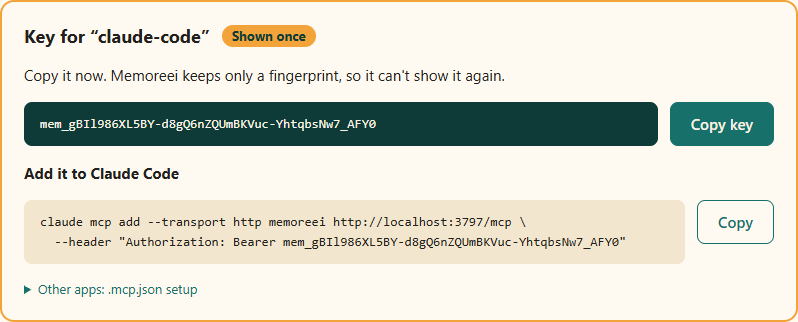
Free · works nowIn memoreei's dashboard, open Connections (on a Mac, Connections… in its menu). Under An app on this computer, press Make a key, name it after the app, and press Create key.
memoreei shows the key once, with the exact line for Claude Code and an .mcp.json for other apps.
Add them to the app, then restart it.
Ask it something only your messages know.
One key per app
Each app gets its own key, so you can revoke one without touching the others. memoreei key list shows when each was last used.
On a server with no screen
An agent like Hermes running on the same server connects the same way. Make the key from the dashboard, or from the command line.
Make a key for the agent, with
memoreei key create hermes, and add memoreei to the agent's MCP settings: the address it prints and an Authorization header with the key. For Hermes:mcp_servers: memoreei: url: http://127.0.0.1:3679/mcp headers: Authorization: "Bearer ${MEMOREEI_API_KEY}"
Also want Claude.ai or ChatGPT?
Those run on someone else's servers, not your computer, so they need an address. So do Claude Desktop's connectors, which Anthropic's servers reach the same way. Two ways, same features: