

My chatbot can't reach memoreei
Your computer is probably asleep or offline. Claude.ai calls this “server not responding” and suggests restarting a server. There's no server to restart. It's your computer.
Check, in this order
Wake your computer. To keep it reachable, turn on Stay awake while plugged in, on memoreei's Connections page. On battery it sleeps as usual, and closing a laptop's lid still sleeps it.
Check memoreei is running, and that its Connections page says Online.
Ask the chatbot again.

Using your own address?
Check your tunnel or proxy is up too. Relay can't help with that one; it's yours.
Did it actually ask?
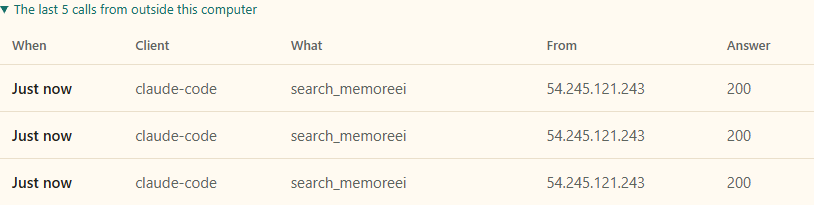
Chatbots sometimes answer from their own memory without asking memoreei. memoreei's Connections page lists the last calls from outside your computer: when, which chatbot, which tool. If it isn't there, the chatbot didn't ask.
Testing from Windows
Use OpenSSL, not Windows' built-in curl, which misreports the connection. Git for Windows includes it.
openssl s_client -connect abcdefghijkl.memoreei.net:443
Next