

Getting started on Linux
The same three routes as on a Mac, from the dashboard in your browser, or one command on a server with no screen.
1. Install
Install the package for your distribution (a .deb, .rpm or tarball) from the latest release, or use pip.
pip install memoreeiOpen Memoreei from your applications: it starts, and opens its dashboard in your browser. Signal is under Sources there. The other sources are set up in a terminal, with
memoreei setup, and chat exports withmemoreei import. On a server,memoreei service installstarts it now and at every login.
2. Pick a route
Where does your chatbot run?
If it's an app on this machine
Free · works nowA local agent such as Hermes, or Claude Code, on the same machine, server included, connects directly. Nothing to expose to the internet.
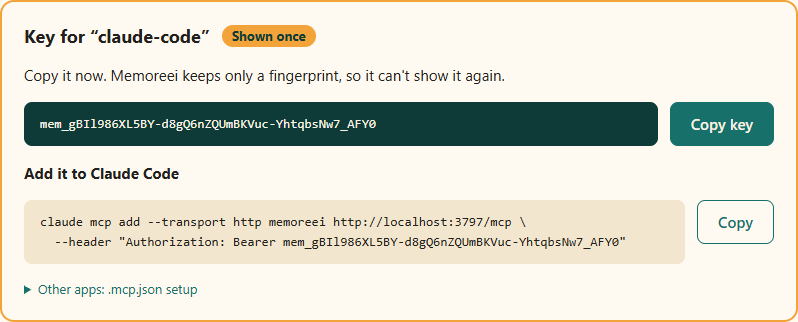
In the dashboard, open Connections. Under An app on this computer, press Make a key, give it a name, and press Create key.
Add it to the app as memoreei shows you: a line for Claude Code, or an .mcp.json for others. With no screen,
memoreei key create hermesprints the same.
If it's Claude.ai or ChatGPT, with Relay
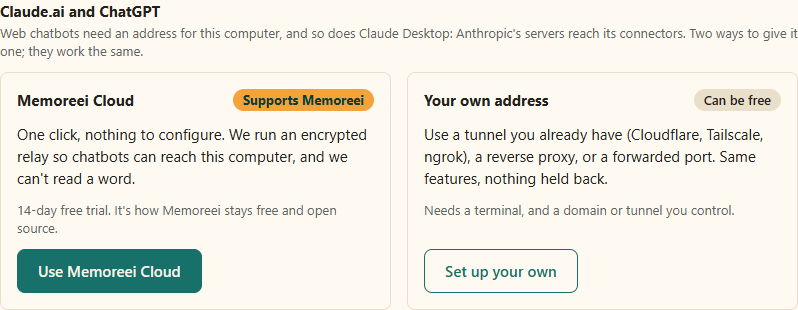
$4 a month · one clickIn the dashboard, open Connections, and under Memoreei Cloud press Use Memoreei Cloud.
A short code shows. Press Open the sign-in page, or go to auth.memoreei.com/device on any device and type the code.
Sign in, check the code matches, and press Connect. The dashboard shows your address.
Relay on a headless server
$4 a month · one clickRun the connect command. It prints a link and a short code.
memoreei cloud connectOpen the link in any browser, a phone included. Sign in, check the code matches, and press Connect.
The command prints your address and finishes. The memoreei service picks it up within a few seconds.
To connect this computer, sign in to Memoreei Cloud and approve it:

  https://auth.memoreei.com/device?code=LBMF-MFLL

or go to https://auth.memoreei.com/device and enter the code

      LBMF-MFLL

Check the page shows this same code. If someone sent you a link to approve, don't: it would put their computer on your account.

Waiting for you to approve it (Ctrl-C to stop)...
  ✓ Approved: this computer is eujahychciw2.memoreei.net
  Getting a certificate for it (about half a minute)...
  ✓ Connected.

Add this address as a connector in Claude or ChatGPT:

  https://eujahychciw2.memoreei.net/mcp

The memoreei service picks this up within a few seconds; if it isn't running, set it up with: memoreei service install

To manage memoreei and approve chatbots from anywhere, not just this computer, set a password (optional):

  memoreei admin password
memoreei admin remote onIf it's Claude.ai or ChatGPT, with your own address
Free · some setupAlready run a reverse proxy on this server? That's most of the work done.